BitBench
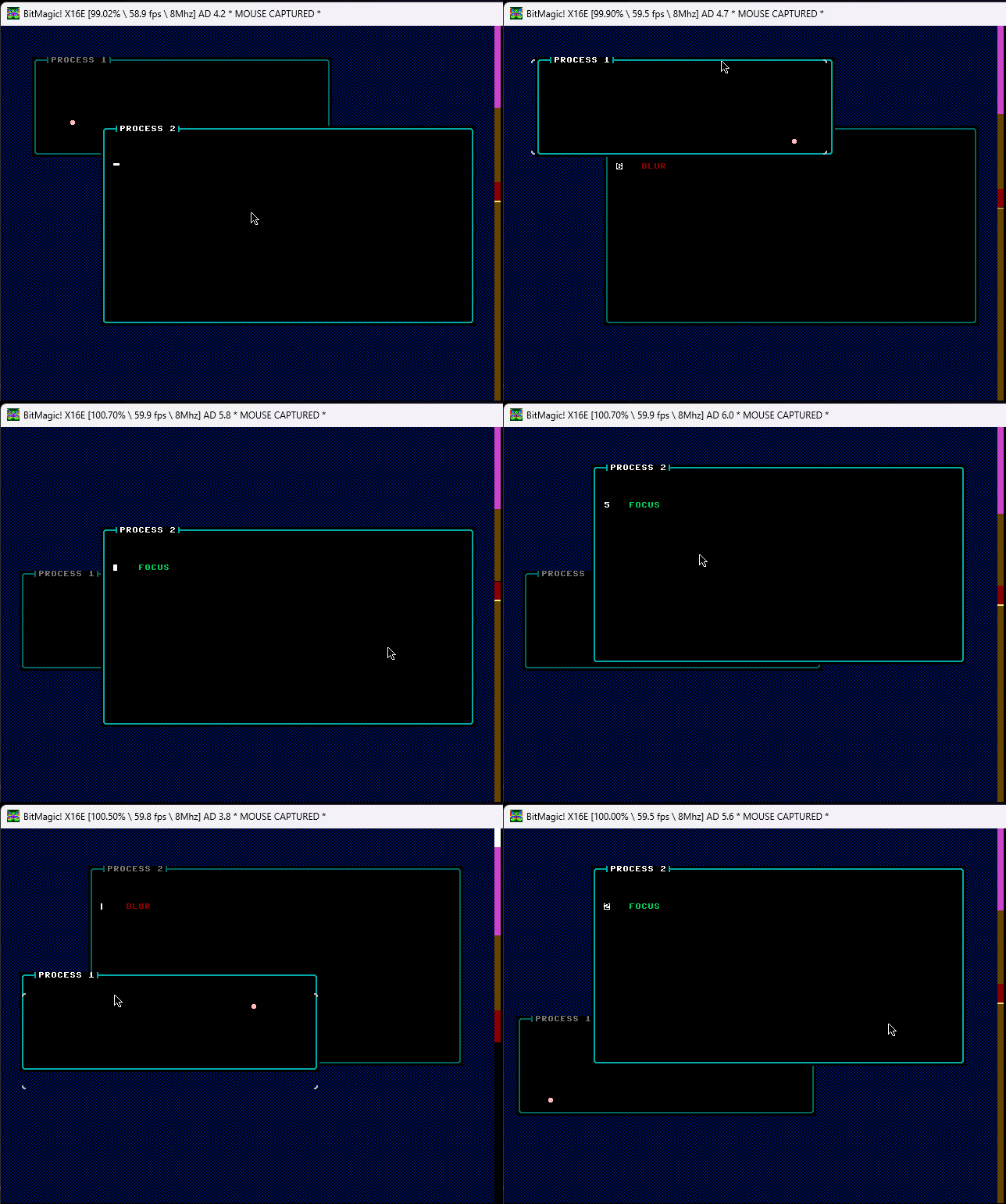
BitBench is a proof of concept for an early Windows style UI on the Commander X16. It has process management, memory management, a windowing system and events. What it doesn’t have is a toolkit of controls, so there are no buttons or text boxes to build a UI from yet.
It can act as an operating system, or as a windowed UI for a single application.
I developed it with BitMagic as a test of BitMagic itself on a substantial project, a practice known as dog-fooding.
Running it
Open the folder in VSCode and press F5. The debugger stops on entry, so press continue to start it. Two test processes start up, each with its own window, and you can drag a window around by its top row.
project.json writes the program to c:\dev\bitbench, so change outputFolder if you’d rather it went somewhere else.
Processes
Each process is loaded into its own base RAM bank. The first few bytes of the bank are a header that says how the process should be called, and holds jump vectors for when events happen.
The X16 has one processor and no way to isolate processes from each other, so BitBench uses simple time slicing:
- On each VSYNC interrupt, the scheduler looks at the active processes and decides which one to switch to.
- A process sets how often it’s called, from every frame (1) to every 255 frames. A value of 0 makes it a real time process, which is called before any process that asks for every frame.
- A process can hand back control once it’s done with its time. If it doesn’t, it’s interrupted and another process is switched in.
- The stack, and a block of zero page from
$22, are kept for each process, so from its point of view they never change. The process sets how many zero page bytes to keep in its header. - A process that calls the kernal or does other IO should disable interrupts first. That way it isn’t switched out part way through, and the kernal’s own values aren’t changed underneath it.
Up to 15 processes can run at once. There’s no way to close one yet.
Memory management
Memory is handed out as RAM blocks in the $0400 to $9e00 range, and as RAM banks from bank 1 upwards. A process asks for memory through the API: banks one at a time, or a number of contiguous blocks.
Windows
A process can create windows, up to 16 at a time across the whole system.
- Events arrive through a callback set in the process’s header. They’re driven by the interrupt, so they can arrive while the process is busy elsewhere.
- The API updates a window’s contents from an x, y position, using the data structure that’s uploaded to VRAM. A second call refreshes the window.
- Windows can be moved by dragging their top row, but they can’t be closed or resized yet.
How it’s built
BitBench is split into libraries, one for each part of the system: memory, processes, the scheduler, the process switcher and the windows. main.bmasm imports them and then gets on with being the main loop.
Libraries and sections
Each library splits its code into two sections: setup, for its segments, scopes and variables, and code, for its procedures. Most of the libraries are plain bmasm, with no C# at all:
file library

section setup
    .segment bench_memory, scope=bench_memory
    .padvar byte[256] blocks
    .padvar byte[256] banks
    .endsegment

section code
    .scope bench_memory
    .proc initialise
    ...
A library like the window manager, which also has C# helpers for drawing, keeps its C# and adds its sections from Initialise() instead.
By default every library’s setup is written before the main program and every library’s code after it, but main.bmasm says where the code goes itself:
    ; every library's procs
    place code
So there’s no mystery about what ends up in the .prg or .bin files, or where. See Libraries for how sections work.
Your own sections
Sections aren’t limited to setup and code. The main loop calls a handler for each part of the system that wants to know when the mouse moves, and that list is a section too. The window manager adds its handler to a mouse section:
Section.Get("mouse").Add(Owner, () =>
{
    jsr bench_window:mouse_move
});
and the main loop places it:
    ; handle mouse movement
    place mouse
This is source reuse rather than linking. If the window manager isn’t imported, nothing is added to the section, and the whole call chain is left out of the binary. It doesn’t matter much for BitBench, but it shows how source reuse can give tighter code than a traditional linker.
And the rest
- Typed variables. Variables are defined with a type. The compiler doesn’t use it, but the debugger does: a location defined as a
ushortshows as a two byte value in the watch window. - Scopes. Each library keeps its variables and procedures in its own scope, which also gives the calling applications a tidy API, such as
jsr bench_process:createprocess. - Generated code. Right-click any
.bmasmfile and choose Show BitMagic Generated Code to see the assembly the libraries produce. - Unit tests. BitMagic is available on NuGet, so the libraries have unit tests. They even check for side effects.
What’s missing
As a proof of concept, a lot is missing:
- Processes can’t be closed.
- Windows can’t be closed or resized.
- Updating a window is slower than it needs to be.
- Events should use a single callback vector, so they’re not constrained.
- It needs a custom character set with lowercase and inverted tiles.
- Windows should have icons for closing and other operations.
- There are no modal windows, such as message boxes.
- There’s no UI toolkit for buttons, text boxes and so on.