FX Cache
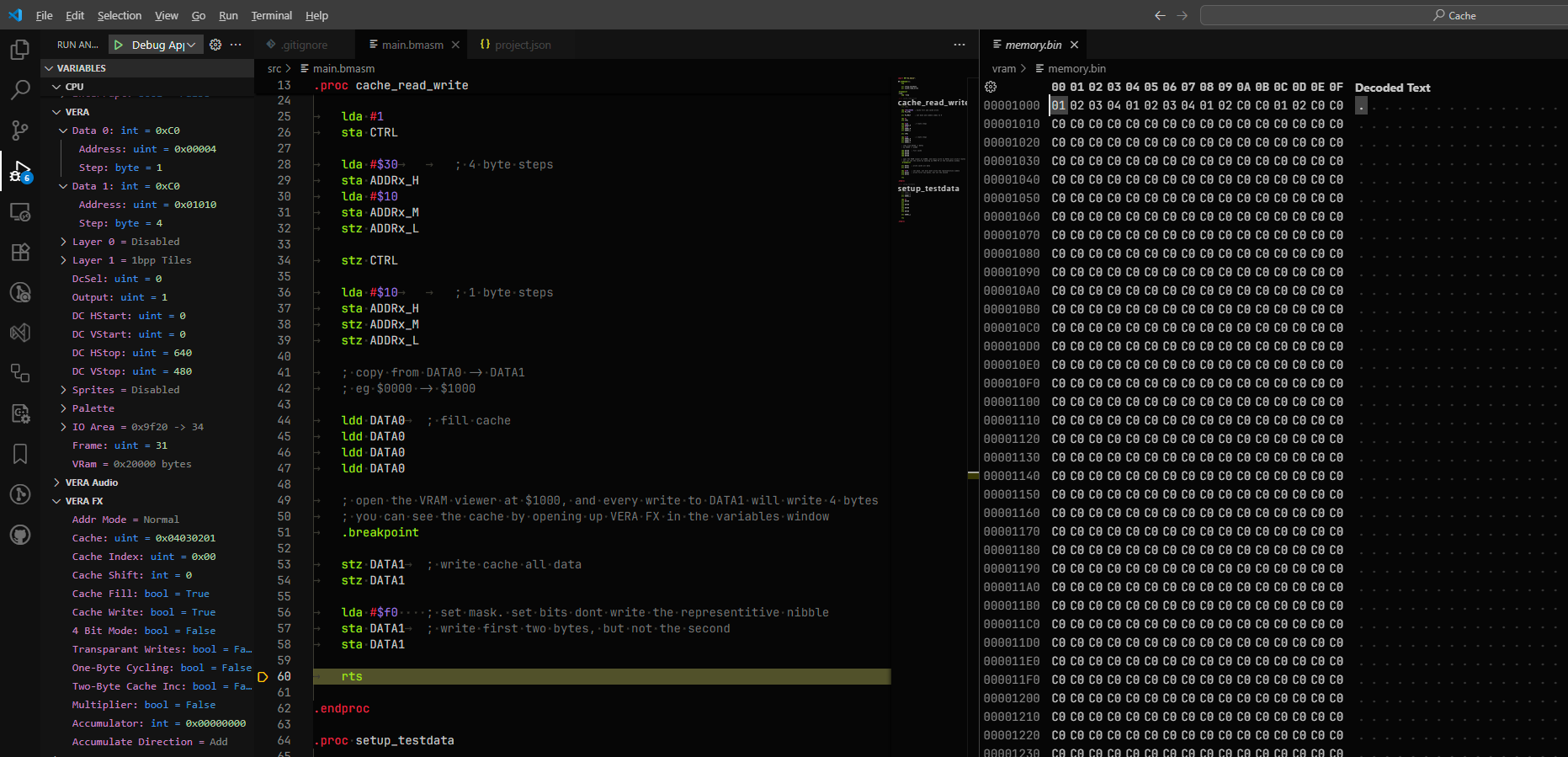
How to use VERA’s FX cache to copy VRAM four bytes at a time, including a write that masks some of the nibbles.
This page covers how the example sets the cache up. For the full behaviour of VERA FX, see the VERA FX reference.
How to run it
Open the folder in VSCode and press F5. The program stops at a .breakpoint once the cache is filled. Open the VRAM viewer at $1000 and expand VERA FX in the variables window to see the cache, then step over each write to DATA1 and watch four bytes change at a time.
Test data
setup_testdata writes $01, $02, $03 and $04 to VRAM at $0000, then points DATA0 back at $0000.
Setting up the cache
cache_read_write turns on cache fill and cache write in FX_CTRL, which is only visible when DCSEL is 2. Writing 0 to FX_MULT resets the cache’s byte and nibble index.
    lda #2 << 1         ; DCSEL = 2
    sta CTRL

    lda #%01100000      ; cache fill and cache write
    sta FX_CTRL

    stz FX_MULT         ; byte and nibble index = 0
Then the two data ports are set up. DATA1 writes to $1000 with an increment of 4, as each cache write covers four bytes. DATA0 reads from $0000 with an increment of 1.
    lda #1              ; ADDRSEL = 1
    sta CTRL
    lda #$30            ; increment 4
    sta ADDRx_H
    lda #$10
    sta ADDRx_M         ; $01000
    stz ADDRx_L

    stz CTRL            ; ADDRSEL = 0
    lda #$10            ; increment 1
    sta ADDRx_H
    stz ADDRx_M         ; $00000
    stz ADDRx_L
Filling the cache
With cache fill on, each read from DATA0 puts the byte into the cache and moves the cache index on. Four reads fill it with $01 $02 $03 $04.
    ldd DATA0
    ldd DATA0
    ldd DATA0
    ldd DATA0
ldd is one of the 65c02’s undocumented opcodes ($dc). It reads the address and throws the value away without changing any registers, which is all that’s needed to trigger the read.
Writing the cache
With cache write on, a write to DATA1 stores all four cache bytes at a four byte aligned address, and the value written is a nibble mask instead of data. Each bit covers one nibble, two bits per byte, and a set bit means don’t write that nibble.
    stz DATA1           ; $1000 = 01 02 03 04
    stz DATA1           ; $1004 = 01 02 03 04

    lda #$f0            ; bits 4 to 7 set: don't write bytes 2 and 3
    sta DATA1           ; $1008 = 01 02, then the last two bytes are unchanged
    sta DATA1           ; $100c = 01 02, then the last two bytes are unchanged