ROM
How to write your own ROM code with BitMagic, and how to debug the official X16Community ROM with full source. You can step from your own program into the kernal, DOS or BASIC and see the ROM’s source as you go!
Writing ROM code
To write ROM code, define a segment that starts in the ROM window and writes to its own file. This defines a segment called ROM at $c000, up to $4000 bytes long, written to ROMEXAMPLE.BIN:
.segment ROM, $c000, $4000, ROMEXAMPLE.BIN

.0xc000_entry:
    nop
.breakpoint             ; the debugger stops here once the code is in ROM
    nop

    rts
To tell the emulator where that file goes, add it to romSource in project.json. This puts it in ROM bank 16:
"romSource": [
    {
        "filename": "app/ROMEXAMPLE.BIN",
        "bank": 16,
        "address": "0xc000"
    }
]
src/test.bmasm is a small program that switches to bank 16 and calls $c000, so you can step from your program into the ROM code:
    lda ROM_BANK
    pha

    lda #16
    sta ROM_BANK
    jsr $c000           ; steps into ROMEXAMPLE.BIN in bank 16

    pla
    sta ROM_BANK
Debugging the X16Community ROM
The ROM source is included as the x16-rom submodule, so clone with --recurse-submodules. BitMagic doesn’t assemble the ROM itself; it uses the debug files that ld65 writes, the same as any other ca65 project.
What you need
- cc65, with
ca65andld65on your path. makeandpatch. On Windows the build runs in WSL, so install them (and cc65) there.
How the ROM is built
BitMagic needs a .dbg file for each part of the ROM, written by ld65 with --dbgfile. The ROM’s own Makefile doesn’t ask for them, and I don’t want to change the submodule, so this folder has its own Makefile that builds the ROM for you:
make
It doesn’t edit x16-rom. Instead it:
- Applies
patches/x16-rom-dbgfile.patchto a copy of the ROM’sMakefile, saved asbuild/Makefile.x16-rom. The patch adds--dbgfileto each ld65 line. - Runs that copy in
x16-rom.
The output is the same as the ROM’s own build, plus a .dbg file next to each part, eg x16-rom/build/x16/kernal.dbg. A part that was linked before you had the patch is linked again, so it gets its .dbg file too. make clean runs the ROM’s own clean.
You don’t need to run make yourself. .vscode/tasks.json has a Build ROM task that runs wsl make, and launch.json runs it every time you press F5, so the ROM is always up to date when the debugger starts.
When the ROM changes
When you update the x16-rom submodule, the patch is applied again. If the ROM’s Makefile has changed too much the patch won’t apply, and the build stops with an error rather than building without debug files. To fix it, add --dbgfile $(BUILD_DIR)/<part>.dbg after -o $@ on each ld65 line of x16-rom/Makefile, then save the diff over patches/x16-rom-dbgfile.patch.
How the project finds the ROM’s source
Each part of the ROM is linked separately, so each part is a cc65 entry in the files array of project.json. This is the kernal:
{
    "type": "cc65",
    "outputs": [
        {
            "filename": "build/x16/kernal.bin",
            "hasHeader": false
        }
    ],
    "debugFile": "build/x16/kernal.dbg",
    "objectFiles": [
        "build/x16/kernal/declare.o",
        "build/x16/kernal/vectors.o",
        "..."
    ],
    "sourcePath": "kernal",
    "includes": [
        "c:\\dev\\CC65\\asminc\\longbranch.mac"
    ],
    "basePath": "x16-rom"
}
| Name | Type | Optional | Description |
|---|---|---|---|
outputs |
array | No | The part’s output file, named as ld65 named it, so with the path from the ROM’s Makefile. The load address is taken from the debug file. |
debugFile |
string | No | The .dbg file written by the build. |
objectFiles |
array | Yes | The part’s object files. BitMagic checks them against the output, and warns if the build is out of date. |
sourcePath |
string | Yes | Another folder to search for the part’s source. |
includes |
array | Yes | Files the ROM uses from your cc65 install. When the ROM is built in WSL the debug file has the Linux path, so these are matched by filename. Change them to match your cc65 install. |
basePath |
string | No | The folder ld65 ran in, which is x16-rom. |
See ca65 Projects for the rest of the options.
How the parts are put in the right banks
Each part is written to outputFolder with its path, eg app/build/x16/kernal.bin. romSource then says which bank each one is in, so the debugger can match the code that’s running to the right source:
"romSource": [
    { "filename": "app/build/x16/kernal.bin", "bank": 0, "address": "0xc000" },
    { "filename": "app/build/x16/dos.bin",    "bank": 2, "address": "0xc000" },
    { "filename": "app/build/x16/fat32.bin",  "bank": 3, "address": "0xc000" },
    { "filename": "app/build/x16/basic.bin",  "bank": 4, "address": "0xc000" }
]
The example has source for the kernal, DOS, FAT32 and BASIC. romBankSymbols loads the .sym files for every bank, so the parts without source still have labels in the disassembly.
Note: romFile must point at the rom.bin you built (x16-rom/build/x16/rom.bin), not the default one, otherwise the source won’t match what’s running.
Example
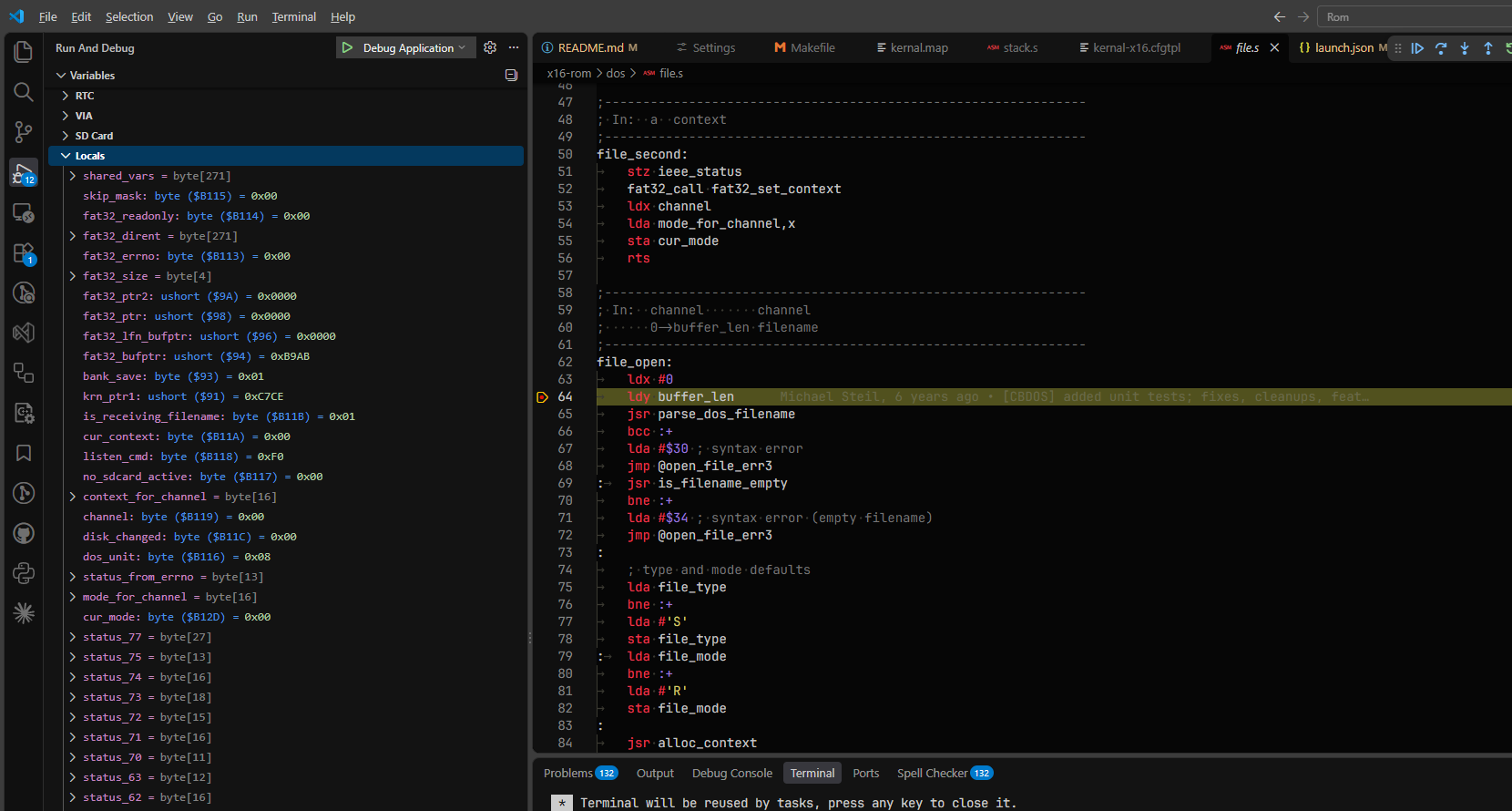
Debugging the X16 ROM with its full source, here stopped on a breakpoint in DOS with the ROM’s variables in Locals: